01
Custom software
Applications, internal tools and new features built around the way your business operates.
Business applications / Operational portals / Product features
Custom software, connected systems and intelligent workflows. FieldDataOps turns the work slowing you down into solutions that move your business forward.
A focused fix. A new feature. An entire workflow.
Illustrative workflow architecture
01 / Solutions
Start with the work that needs to improve. We design and implement the right application, integration or automation around it.
Applications, internal tools and new features built around the way your business operates.
Connect your applications, APIs and databases. Keep information moving with validation, recovery and reconciliation built in.
Replace repetitive handoffs with a controlled process. Route work, manage exceptions and make the next step clear.
Extract information, find supporting records and assist operational decisions. Use agents with defined tasks, permissions and human approvals.
Connected field operations
Connect the work before, during and after a field visit. We implement the integrations around your ArcGIS environment so information can move from business systems to crews, reviewers and back again.
Business systems, design files, documents and spreadsheets.
Map fields, validate records and reconcile exceptions.
GIS layers, digital work packages and locate-readiness information.
ArcGIS Field Maps and Survey123 capture work updates and evidence.
Progress, dates, status and traceable record changes.
Retrieve attachments, check completeness and route uncertain evidence for human review. Evaluate AI assistance where appropriate.
Project tracking, evidence review and decision-ready reports.
Reviewed summaries, exports and scoped writeback to connected systems.
Use work readiness and reviewed progress to inform crew and resource schedules. Approved plans return to field execution.
An implementation roadmap, not a ready-made platform. Select the modules your workflow needs. AI assistance, production writeback and scheduling are separately scoped and validated.
A first pilot can read one authorized ArcGIS feed and its attachments, flag missing evidence and produce a reviewed completion extract. Agree on access, acceptance tests and handoff before implementation.
Discuss one workflowThe initial pilot uses an approved test environment, with no production writeback or automated acceptance of field work.
02 / The work in practice
These solution patterns show where custom software and automation can make an operational difference.
Extract the information that matters, validate it and send a structured record to your business system. Give exceptions a clear review path.
Illustrative applications, not measured customer outcomes.
ArcGIS / Synthetic demonstration
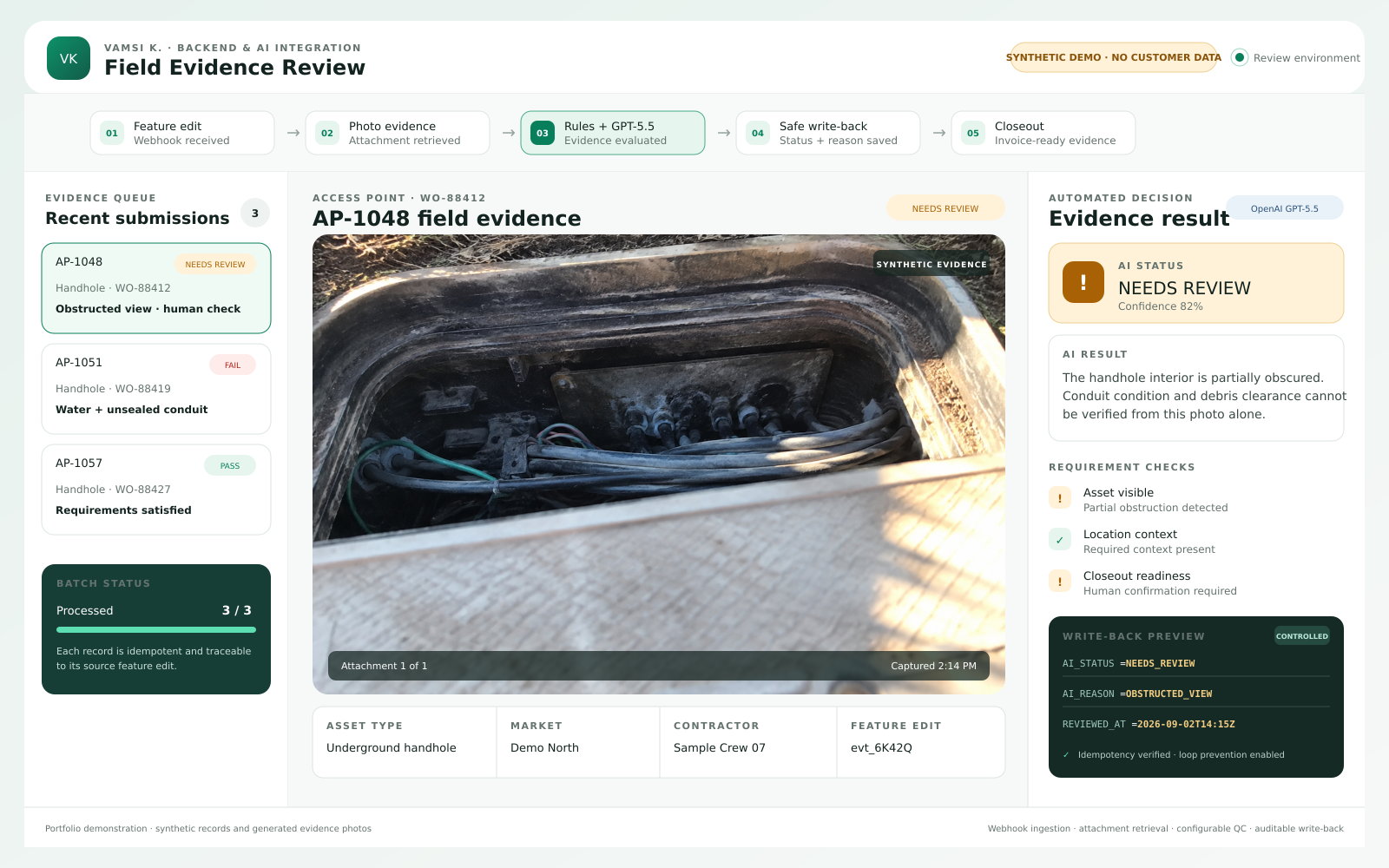
Capture a field submission, retrieve its attachments, evaluate the evidence and prepare a controlled write-back. Route ambiguous cases for human review.
The demonstration uses generated photos and synthetic records. It illustrates the workflow; customer acceptance and business impact must be measured in an engagement.
03 / Delivery
Move from the requirement to a useful release, with agreed milestones, practical testing and a handoff you can use.
Agree on the problem, the systems involved and what successful delivery means.
Implement the agreed scope, demonstrate progress and test the behavior that matters.
Deploy, document and hand over the solution, including exception handling and operational follow-through.
Focused improvements deserve momentum. Small fixes, individual integrations and larger software builds are all welcome.
We agree on timing after reviewing requirements, access, dependencies and testing. Priority delivery is available when scope and readiness support it.
Find a useful starting point
Use your current volume and review time to estimate the effort involved. An engagement establishes the real baseline and what can be automated.
Two ways to start
If you know what needs to be built, we can scope and quote the work directly. If an ArcGIS workflow needs investigation first, the diagnostic provides a bounded starting point.
Discuss a feature, fix or software buildArcGIS workflow diagnostic
Review one workflow, one ArcGIS environment and an agreed sample.
For delivery partners
Add a specialist implementation workstream to your ArcGIS or software delivery. We can take on data adapters, field-data processing, review tooling or operational reporting through a white-label or co-delivery arrangement. You retain account leadership and the customer relationship.
Scope, security permissions, customer communication and support responsibilities are agreed together. FieldDataOps does not claim Esri partner status or endorsement.
Let's make it work.
Tell us about the process, integration or software you need.
We will help define a practical starting point.
US-based delivery.
Onsite working sessions and demonstrations can be arranged when useful.